Getting Started
This sections explains how to install QuantLibXlOil and how to access QuantLib functions in Excel.
QuantLibXlOil can be installed via pip.
Note: Remove any installation of the classical QuantLib Excel add-in if installed prior to installing QuantLibXlOil.
Setup Python Environment
We recommend setting up a clean Python environment with conda (or venv).
conda create -n xloil python
conda activate xloil
Install QuantLibXlOil and Dependencies
QuantLibXlOil is available via pip.
pip install -U quantlib_xloil
This step also installs the following dependencies:
xlOil for interfacing Python and Excel.
QuantLib library with Python interface.
Install xlOil Excel Add-in
xlOil comes with an installer script which can be run on the command line within the Python environment.
xloil install
Above step installs the xlOil Excel add-in and an xlOil.ini configuration file. Details on xlOil installation can also be found here.
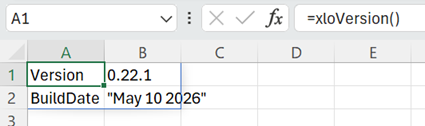
Installation can be verified by opening Excel with a blank workbook. Type =xloVersion() in an empty cell and enter. This should display an output similar to the one below.
Load QuantLibXlOil Functions
To make the QuantLib wrapper functions available in Excel, the xlOil add-in needs to be configured.
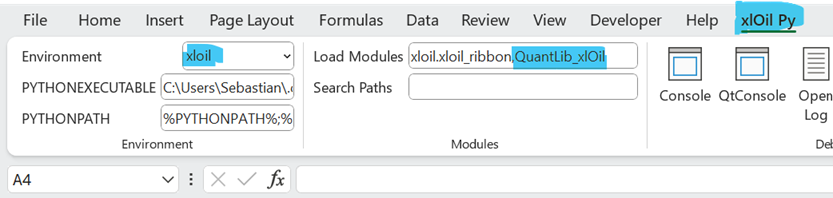
xlOil comes with a custom menu ribbon xlOil Py. The menu block Modules contains a text input field Load Modules.
Add QuantLib_xlOil to the text field Load Modules. Use comma separation without spaces. The resulting entry in Load Modules should be
xloil.xloil_ribbon,QuantLib_xlOil
Restart Excel and open a blank workbook.
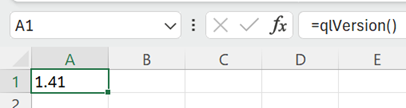
Test the QuantLib functions by entering =qlVersion() in an empty cell. This should produce a result like 1.41.
Now, you are all set for QuantLib in Excel.